

Last checked: October 11, 2026 · Source: Hallasan National Park official booking site (visithalla.jeju.go.kr) — notices linked below.
Yes, it’s free, according to Jeju Province’s announcement (reported Sept 3, 2026). Since September 1, 2026 you can download your Hallasan summit certificate as a free PDF straight from the official booking site (visithalla.jeju.go.kr). There’s no 1,000-won kiosk fee and no app to install. You need your reservation number and a photo taken at the summit on the same day, and you must apply and download on the day of your hike. The paper (kiosk) and mobile-app certificates still exist too.
At a glance
- Announced: Aug 27, 2026 · Service start: Sept 1, 2026
- Cost: free, per Jeju Province’s announcement (the paper certificate from the kiosk costs 1,000 won)
- What you need: reservation number + a summit photo taken that day
- Deadline: apply and download on the same day — no next-day issue
- GPS check on the photo: dropped since May 20, 2026
- Help: certificate questions go to the park’s management office, +82-64-710-7817; general booking help is +82-64-713-9953 (weekdays 9:00 a.m.–5:30 p.m.; on weekends and holidays use the website)
If you haven’t booked the summit trail yet, start with our step-by-step guide: How to book Hallasan.
Who can get a certificate?
The certificate is tied to a trail reservation. Every application method asks for your reservation number, so in practice it is for hikers who booked a summit trail (Seongpanak or Gwaneumsa) and reached Baengnokdam, the crater at the top.
The official notice does not list any other conditions — no age limit, no nationality rule. It simply starts from “arrive at the summit.”
If you booked for a group, the form asks you to choose the hiker (탐방객 정보 선택), so each person in the booking can get their own certificate. The certificate page also has a companion section (동반객): the Korean version asks for a name and phone number, the English version for a name and email.
How does the system know you reached the summit?
This is the part people get wrong, so here is what the official pages actually say:
- It is the photo. You upload a photo taken at the summit. The certificate page says the photo information must match your hike date, and you must upload a picture taken that day.
- No more GPS check. Until spring 2026 the photo’s GPS data was used. A notice dated May 16, 2026 says that from May 20, 2026 the GPS information in uploaded photos is no longer used. The same-day rule did not change.
- Your reservation ties it together. The reservation number links the certificate to the person who entered the trail with a QR code and ID check that morning.
So: take a clear summit photo on your own phone, on the day. The official rule only says the photo must be taken that day; it says nothing about whose phone took it. Either way, you need the file on the device you use to apply.
Accepted file types on the certificate page: JPEG, JPG, PNG, up to 95 MB.
Getting the free PDF: the steps
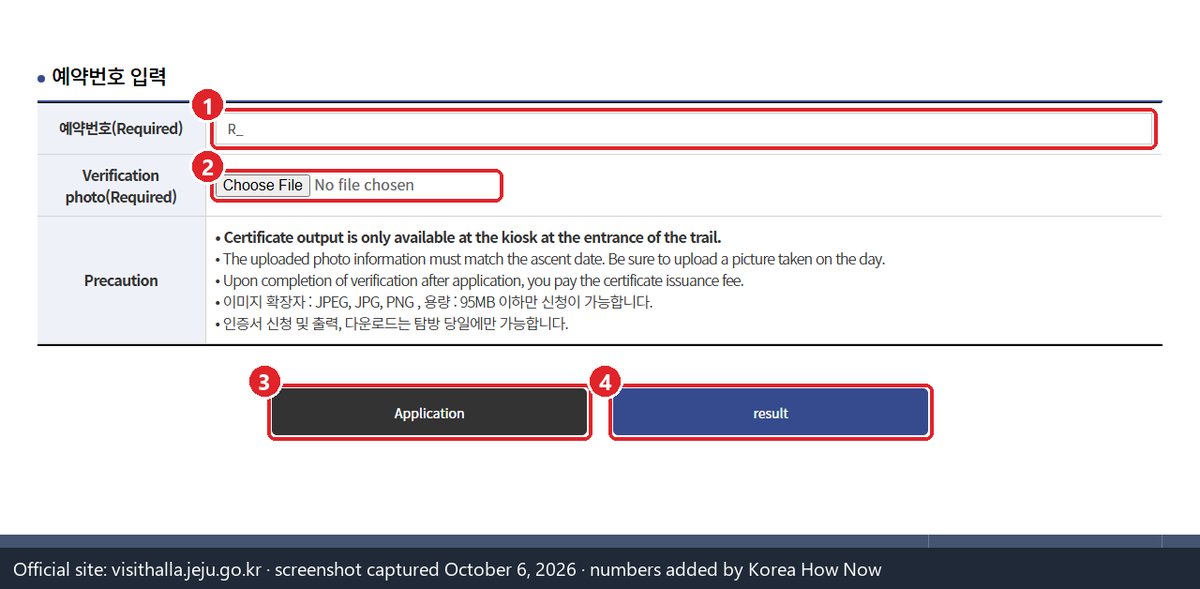
These are the 10 steps from the official notice (seq 1299), in plain English:
- Reach the summit (Baengnokdam).
- Open the booking site visithalla.jeju.go.kr on your phone.
- Go to Community → Summit certificate (커뮤니티 / 등정인증).
- Enter your reservation number.
- Select the hiker the certificate is for.
- Upload your summit photo.
- Tap Apply (신청).
- Open Reservation inquiry (예약조회).
- Next to the “Details” (상세보기) button, tap “Summit Certificate” (등정인증서).
- Save the certificate as a PDF.
The notice describes these menus on the Korean site. If you can’t find the “Summit Certificate” button in step 9 on the English site, switch the language to 한국어 (top of the page) and look next to 상세보기.
Jeju Province’s announcement also says you can put the summit photo you uploaded onto the certificate, so pick a good one.
Mobile signal on the summit can be weak. You can do steps 2–7 at the top when you have signal and steps 8–10 later — but all of it has to be finished before midnight on the same day. The notice says this applies to every certificate method: “same-day application and same-day issue are required.”
One exception to plan around: on the day next month’s bookings open (the first working day of each month, 9 a.m.) and the evening before it, the site runs maintenance from 8 to 10 p.m. Korea time, and the notice says certificate applications may not work then. The next ones are Sunday, November 1 and Monday, November 2, 2026. If you hike on those days, finish the whole process before 8 p.m.
The three ways to get a certificate
The homepage PDF did not replace the older methods. Notice 1299 says the paper/kiosk and mobile-app methods “are not ending and can still be used.”
| Method | Where you get it | Cost | Notes |
|---|---|---|---|
| Homepage PDF (new, from Sept 1, 2026) | visithalla.jeju.go.kr → Reservation inquiry → “Summit Certificate” | Free | No app, no queue |
| Paper certificate | Kiosk (무인단말기) at the trailhead entrance, after you come down | 1,000 won, paid by card at the kiosk | You receive a print code, enter it at the kiosk, pay, print |
| Mobile certificate | JEJU IoT app (Google Play / App Store) | Free | Needs the app installed; gives an image file |
The prices come from the park’s June 2026 notice (app = free, paper = card payment) and Jeju Province’s September 2026 announcement of the PDF service (PDF = free, paper = 1,000 won).
How the paper (kiosk) certificate works
From the park’s June 5, 2026 notice and FAQ:
- At the summit, register your photo on the booking site.
- You receive an approval / print code. It is sent to the contact details you gave when booking — KakaoTalk first, then text message, then email.
- After the descent, type the code into the unmanned kiosk at the trailhead entrance.
- Pay the 1,000-won fee by card and print.
When the certificate doesn’t work
I forgot to apply at the top and it’s now the next day.
The rules are strict here: every method requires same-day application and same-day issue. The June 2026 notice says photos from another date, or applying after your hike day, cannot get a certificate. There is no late request on the website.
The certificate page says I can only print at the kiosk.
As of October 11, 2026, the certificate page (/certi/regist.do) still says “Certificate output is only available at the kiosk at the entrance of the trail” (the Korean version says the same), even though the same page also says application, printing and download are only possible on the hike day. The notice from Aug 27, 2026 is newer and adds the PDF button under Reservation inquiry. Follow the notice. The same page also still says a certificate fee is paid after approval. Jeju Province announced the homepage PDF as free; if you are asked to pay for the PDF, call the management office on +82-64-710-7817 before paying.
My photo was rejected.
The page only says the photo information must match your hike date, so the usual cause is a photo the system doesn’t read as taken that day. Edited, re-saved or screenshot images may lose that date information. Upload the original JPG/PNG from your camera roll. The GPS rule no longer applies since May 20, 2026, so a photo with location turned off should be fine as long as it was taken that day.
I never got the print code.
The FAQ says the code goes to the phone number or email you gave when booking, trying KakaoTalk first, then text message, then email. If you booked with a foreign number, check that email (and spam folder). Still nothing? The FAQ says to ask at the information desk at the trailhead entrance. This only matters for the paper certificate; the PDF method shows the button in Reservation inquiry and doesn’t need a code.
I can’t find my booking in Reservation inquiry.
Sign in with the same method you used to make the reservation (FAQ Q14: a non-member booking only shows up under non-member login, a Kakao booking only under Kakao login).
Someone else in my group needs one.
At step 5 you choose the hiker. Repeat steps 3–7 for each person in the booking, uploading a summit photo taken that day each time.
What to have ready on hike day
- Booking for Seongpanak or Gwaneumsa, with the reservation number saved somewhere offline (screenshot).
- A plan for getting to the trailhead: Jeju Airport to Seongpanak by bus and taxi.
- Phone charged, plus a power bank. You’ll use it for the QR code at the gate, the summit photo and the application.
- Know where the menu is: Community → Summit certificate, then Reservation inquiry → Summit Certificate.
- Plan to finish everything before midnight Korea time on hike day (before 8 p.m. on Nov 1–2, 2026: site maintenance).
- Your passport or other photo ID. Rangers check ID against your QR booking when you enter; if they don’t match, you can’t go up and get a one-year entry ban, so no hike and no certificate.
Read next
Sources
- Notice 1297: maintenance 8–10 p.m. on booking-opening day and the day before, certificate applications may be limited, checked Oct 11, 2026 (Korean)
- Notice 1295: ID check at entry, one-year entry ban if ID and QR booking don’t match, checked Oct 11, 2026 (Korean)
- Homepage PDF certificate service, 10 steps, same-day rule, older methods still available (posted Aug 27, 2026; service from Sept 1, 2026)
- Free PDF and 1,000-won paper fee — Jeju Province World Heritage Office announcement, as reported Sept 3, 2026: gukjenews.com · khan.co.kr
- Paper (kiosk, card payment) vs JEJU IoT app (free), same-day rule (June 5, 2026)
- GPS photo check dropped from May 20, 2026
- Certificate application page (photo rules, file types, fee after approval, kiosk text)
- FAQ Q13 (certificate code delivery order) and Q14 (log in the same way you booked)
- Gwaneumsa reopening Sept 24, 2026