
Last checked: October 16, 2026 · Sources: Korail’s English website and press releases, Korean government notices, and the SRT website notices, linked below.
Affiliate note: This post contains a Klook affiliate link. If you book through it, we earn a commission at no extra cost to you. The official ways to do things always come first. How we handle links.
Use Korail’s English website (korail.com/global/eng/main; the old letskorail.com address now forwards to korail.com) in Chrome or Safari. You don’t need an account: you book with just an email address and a password, and Korail says it accepts overseas cards such as Visa, Mastercard and UnionPay. Since September 1, 2026, former SRT trains run as KTX under Korail, so the same site also sells the trains from Suseo (Gangnam). When a foreign card fails, the cause travelers most often report is the card’s own security check (3D Secure), not the booking itself.
Which site or app should I use?
| Option | Good for foreigners? | Notes |
|---|---|---|
| korail.com English pages (korail.com/global/eng/main) | Yes — start here | Site languages: English, Japanese, Chinese (simplified and traditional), Vietnamese, Thai and Indonesian. Overseas cards accepted. No account needed. |
| Korail+ (코레일+) app | Unclear for visitors | Replaced Korail Talk and the SRT app as the single app. Korail’s English guide lists it as a sales channel, but Korail hasn’t said whether you can sign up without a Korean phone. |
| SRT website / app (etk.srail.kr) | No longer needed | SR says its app and website stopped selling high-speed tickets on Aug 31, 2026, apart from non-member booking for a limited period. Suseo trains are now sold by Korail. |
| Station ticket counter | Yes | Seoul Station has a foreigner priority counter with live voice translation in 15 languages, plus machines that take overseas cards. |
What changed on Sept 1 and Oct 1, 2026
Two changes matter for visitors. Since September 1, 2026, the former SRT trains from Suseo station in southern Seoul run as KTX and are sold by Korail, so one website now covers every high-speed train. And since October 1, tickets go on sale two months ahead at 7:00 a.m. Korea time. Our booking-window guide lists the next busy opening dates and converts 7:00 a.m. KST to your time zone.
The government also says Visa, Mastercard and UnionPay are accepted, that the site will add French, German and Mongolian by the end of 2026, and that WeChat Pay and Alipay are being developed with no launch date yet.
Member or non-member?
| Non-member | Member | |
|---|---|---|
| Sign-up needed | No | Yes |
| What you enter | Email + password | Account details |
| Korean phone needed | No | Not stated by Korail |
| Best for | Visitors on a short trip | Residents, frequent riders |
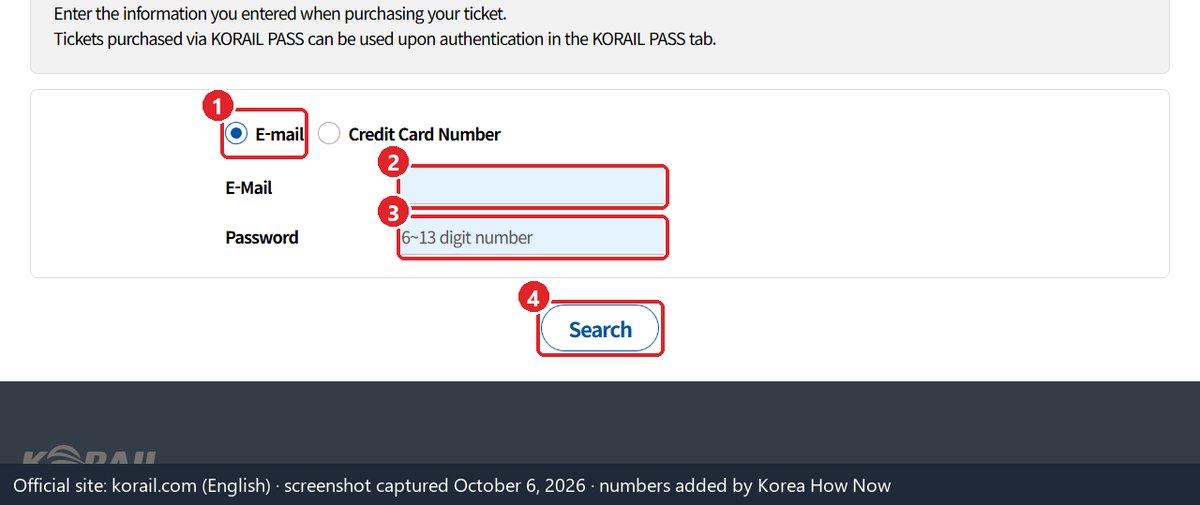
For visitors, non-member is the route Korail’s English site is built around. Korail says that since April 2025 you no longer enter nationality, name or gender when buying, only an email address and a password. Korail’s English guide warns that you must type both exactly (upper and lower case count) to find your ticket later, so write them down. You’ll also need them to change or refund the ticket.
Booking as a non-member: the steps
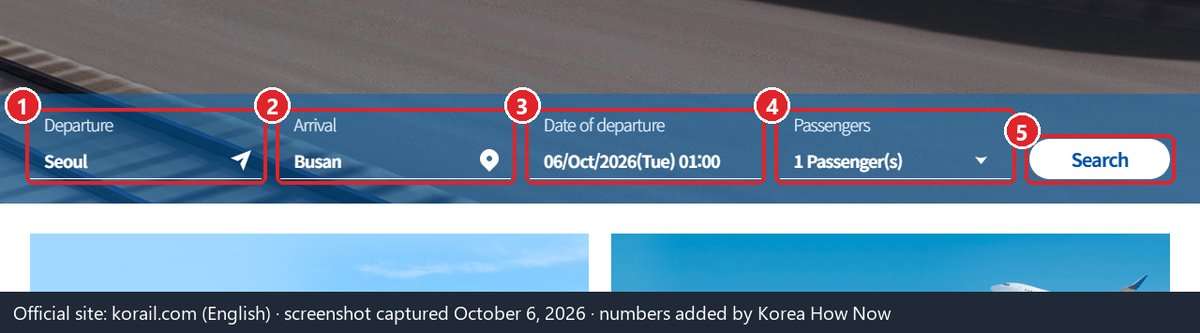
- Open korail.com/global/eng/main in Chrome, Samsung Internet or Safari. Korail says opening the site from inside a social-media or portal app may not work.
- Search your route and date. Remember: up to 2 months ahead.
- Pick your seat on the seat map (added in the late-2024 redesign).
- Enter your email and a password.
- Pay by credit card. Your bank may show a 3D Secure check (app approval or SMS code). Approve it.
- Keep the ticket on your phone. You can look it up any time under MY TICKET with the same email and password.
If your foreign card is declined
These are the problems travelers and third-party guides report most often. Korail does not publish an official list of payment errors.
Payment declined with no clear reason.
- 3D Secure not turned on. Many declines happen at the bank’s identity check. Turn on 3D Secure / online purchase verification in your banking app, then try again. Some banks also block the first overseas online payment: approve it in the app, or call them.
- Name mismatch. If asked for the cardholder name, type it exactly as printed on the card, with the same spelling, spacing and hyphens.
- Wrong browser or in-app browser. Open the site directly in Chrome or Safari, not from a link inside Instagram, KakaoTalk or a search app.
I can’t find a sign-up option.
The English site has no member sign-up menu, and you don’t need one. Book as a non-member.
I booked on the SRT site before, where do I go now?
From Sept 1, 2026, Suseo trains are sold by Korail as KTX, on korail.com, the Korail+ app and at station counters. SR says tickets booked as a non-member on the SRT app or site can be looked up in Korail+ with a non-member login (the korail.com website works the same way).
My card still fails after all of this.
Buy at a station. Korail says 148 stations have newer ticket machines that take overseas credit cards, and Seoul Station has a foreigner priority counter. Since spring 2025, station counters have also accepted Apple Pay, including with cards issued abroad.
I’m traveling over Christmas or New Year.
Christmas and New Year trains follow the normal rule: each train goes on sale at 7:00 a.m. KST two calendar months before its departure date, so book busy dates on that morning. The exception is trains whose schedule Korail changes: in October 2026 it announced timetable changes from Nov 1 and put those trains on sale at separately announced times, so check Korail’s notices if your train isn’t listed yet. The opening-date table lists the other busy days.
Check these before you pay
| Check | Why |
|---|---|
| 3D Secure / online verification is on in your banking app | The most commonly reported reason foreign cards fail |
| Your bank allows overseas online payments | Some banks block the first foreign online charge |
| You know the exact name printed on the card | Typos and missing hyphens can cause declines |
| You are in Chrome or Safari, not an in-app browser | Korail’s own advice |
| A stable connection (not train Wi-Fi) | Korail warns that Wi-Fi on the move can drop the connection |
| You saved the email + password you’ll use | You need them to find or refund a non-member ticket |
Cancelling or changing your ticket
Non-member tickets are cancelled from MY TICKET on the English site with the same email and password, any time before the departure time on the ticket. Once the train has left, a refund is only possible at a station ticket counter, and after the train’s arrival time there’s no refund at all. Korail says tickets can now be changed to a train within 7 days of the original date without a fee, but its English guide doesn’t describe how to do this on the non-member site. If you can’t find a change option under MY TICKET, cancel and rebook, or ask at a station counter. Korail’s call center for foreign visitors: +82-1599-7777 (08:00–20:00 KST).
The fee depends on when you cancel and on the day you travel. Korail’s English ticket guide lists these rates (checked October 6, 2026):
| When you cancel | Trains Mon–Thu | Trains Fri–Sun and public holidays |
|---|---|---|
| 2 months to 2 days before departure | Free | Minimum fee |
| The day before | Free | 5% |
| 24 to 3 hours before | Free | 10% |
| Within 3 hours of departure | 5% | 20% |
| Up to 20 minutes after departure (station only) | 15% | 30% |
| 20 to 60 minutes after departure (station only) | 40% | 40% |
| 60 minutes after departure until arrival (station only) | 70% | 70% |
In practice: if your plans might change, a weekday train cancelled a day ahead costs nothing, while the same move on a Friday costs 5%. Korail applies the weekend rates during traditional holidays such as Seollal and Chuseok as well. Korail also says a refund within 10 minutes of payment is free, which helps if you spot a mistake right after booking.
Korail Pass: worth it?
The Korail Pass is a foreigner-only pass for 2–5 travel days, from ₩131,000 for adults. Since KTX fares dropped about 10% on Sept 1, 2026, it usually costs more than single tickets unless you take several long trips in a few days: our Korail Pass break-even guide has the prices, the math and the rules.
Another place to buy it: Klook also sells the Korail Pass, so you can pay in your own currency. It is still the same foreigner-only pass: you reserve each seat on Korail’s site or app afterwards. Korail’s pass page no longer lists SRT among the exclusions, but it hasn’t clearly said whether the former SRT trains from Suseo (now KTX) are covered: not officially confirmed — check before you go. Compare the price with Korail’s English site first: Korail Pass on Klook (affiliate link).
Not sure which Seoul station your train leaves from? Since September 2026 “KTX” can mean Seoul Station or Suseo: see Seoul Station vs Suseo KTX.
Read next
Sources
- Korail English notice on Korail Pass prices, Nov 11, 2025: adult and child prices, ages
- Korail English Ticketing Guide: cancellation fees and refund rules (checked Oct 6, 2026)
- Korail English website: home and menu (korail.com), Ticketing Guide with the 2-month window, email + password and refund rules (korail.com), Korail Pass booking page with the refund rule, checked Oct 7, 2026 (korail.com)
- MOLIT announcement, Sept 20, 2026: 2-month window, 7 → 10 languages, Visa/Mastercard/UnionPay, WeChat Pay/Alipay in development (as reported by Domin Yonhap News): krcom.co.kr — original: molit.go.kr
- KTX–SRT integration, fare cut, Korail+ app (korea.kr, Aug 31, 2026)
- Booking channels and membership conversion (Hankook Ilbo, Aug 2, 2026)
- SR notice, Aug 21, 2026 (SRT app and website booking ends Aug 31; Suseo trains on Korail+ and korail.com)
- SR notice, Sept 30, 2026 (finding non-member SRT bookings in Korail+)
- Korail, May 18, 2025: non-member booking with email + password only, Apple Pay at counters, Seoul Station foreigner counter
- Korail, Dec 24, 2024: seat map, Seoul Station foreigner counter, overseas-card machines
- Korail, Dec 22, 2023: QR codes to foreign-language booking site with overseas card payment
- Korail, Dec 29, 2025: Korail Pass Plus launch, Korail Pass adult prices, 148 stations with overseas-card machines
- Card-decline causes (third-party guide, updated Sept 17, 2026)
- Seoul–Busan fare cut from ₩59,800 to ₩54,400 (Hankyung, Aug 31, 2026)