
Last checked: October 6, 2026 · Sources: Korean government (MOLIT) announcement, Google’s Korea blog, NAVER press releases, and our own test on Google Maps, linked below.
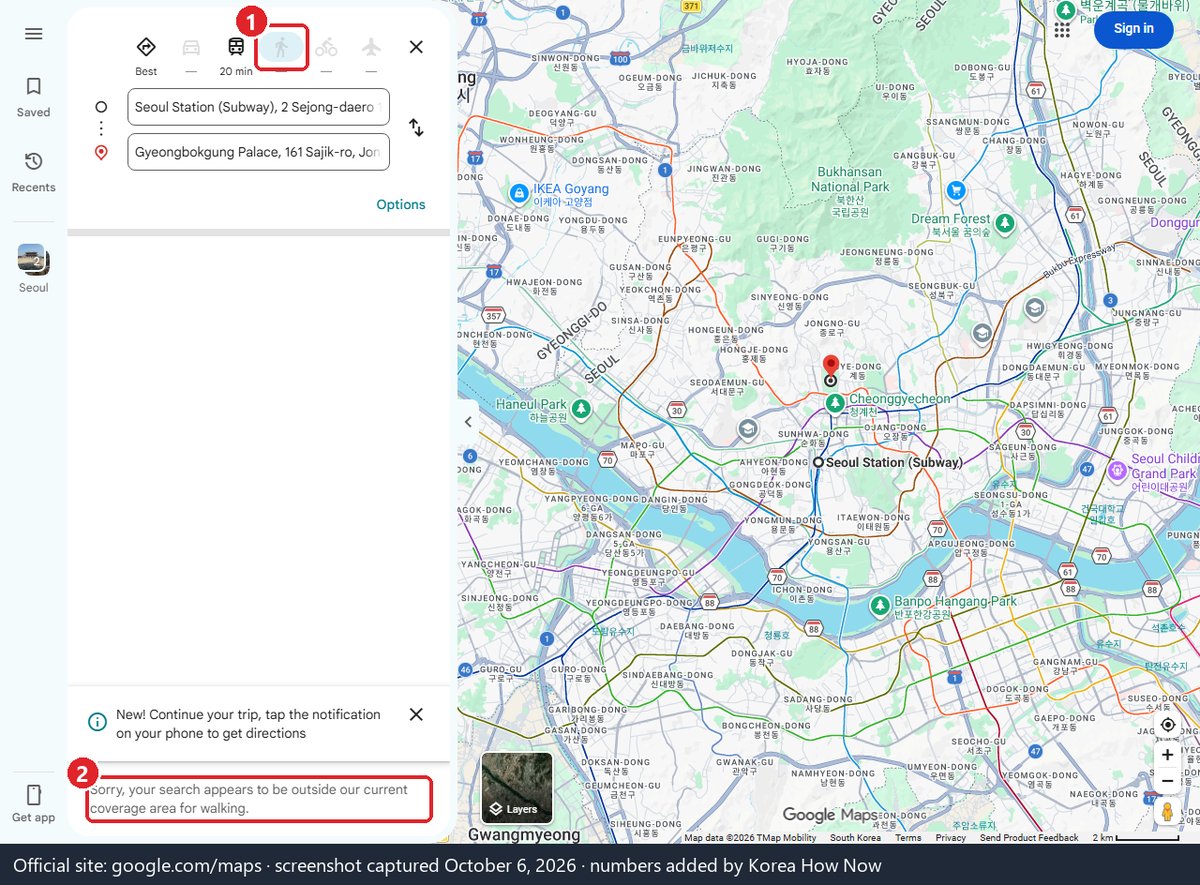
Partly. Google Maps in Korea shows the map, place search and public transit directions, but walking, driving and cycling directions still don’t work. When we tested Seoul Station → Myeong-dong Station on google.com/maps on October 4, 2026, transit gave a route; walking, driving and biking all returned “Sorry, your search appears to be outside our current coverage area.” The government conditionally approved Google’s request to export detailed map data on February 27, 2026, but data can only leave Korea after the government checks that Google has met the security conditions. No launch date has been announced. For now, use Naver Map (English version) as your main app.
What works today
| Feature | Google Maps in Korea (Oct 4, 2026) |
|---|---|
| Map and place search | Works |
| Reviews, photos, opening hours | Works (coverage thinner than Korean apps) |
| Public transit directions (subway, bus) | Works |
| Walking directions | Not available (“outside our current coverage area”) |
| Driving directions / turn-by-turn navigation | Not available |
| Cycling directions | Not available (“outside our current coverage area for biking”) |
Google itself wrote in August 2025 that Korea is the only country where its directions feature isn’t offered, and said it was in close talks with the Korean government. It gave no date then and has not published one since.
Why Google Maps is limited in Korea
Korea restricts sending detailed national map data abroad for security reasons. Google asked for permission to export the government’s 1:5,000-scale base map to its overseas data centers; Korea had refused earlier requests. Korean apps such as Naver Map and Kakao Map use the data on servers inside Korea, so they can offer full walking and driving directions.
What changed on February 27, 2026
The Ministry of Land, Infrastructure and Transport (MOLIT) said a government council that reviews map-data exports approved Google’s request for 1:5,000 map data on condition of strict security measures. According to the government’s announcement, Google must:
- Blur military and security facilities in Google Maps, Google Earth (including historical imagery) and Street View.
- Process the data on servers inside Korea and have it checked before export.
- Export only the minimum information needed for navigation and directions. Sensitive layers such as contour lines are excluded.
- Correct the data immediately when facilities change.
- Set up a system to prevent security incidents.
- Keep a dedicated map officer in Korea to work with the government.
- Provide an emergency technical measure (a “red button”) for national-security threats.
The government says it will check compliance itself before allowing the data to leave Korea, and can suspend or revoke the permission for continued non-compliance or serious violations.
So when will walking and driving directions arrive?
Nobody official has said. The approval is conditional, and the conditions have to be met and checked first. Media reports have floated timelines, but neither MOLIT nor Google has announced a date, so we won’t guess one.
What this means for a trip in the next few months: plan on Google Maps not walking you to your hotel. We will update this page when Google or the government announces a change.
Timeline so far
| Date | What happened | Source |
|---|---|---|
| Aug 5, 2025 | Google says its directions feature is unavailable only in Korea and that it is in close talks with the government | Google Korea blog |
| Feb 27, 2026 | Government council conditionally approves export of 1:5,000 map data, with security conditions | MOLIT / korea.kr |
| After Feb 27, 2026 | Government to check Google’s compliance before any data leaves Korea | MOLIT / korea.kr |
| Oct 4, 2026 | Our test: transit works; walking, driving and biking still “outside our current coverage area” | Our test on google.com/maps |
| Oct 6, 2026 | Re-check: walking still shows the same message (screenshot above) | Our test on google.com/maps |
| Next step | Google launch of walking/driving directions | No date announced |
Using Google Maps transit in Korea: what to expect
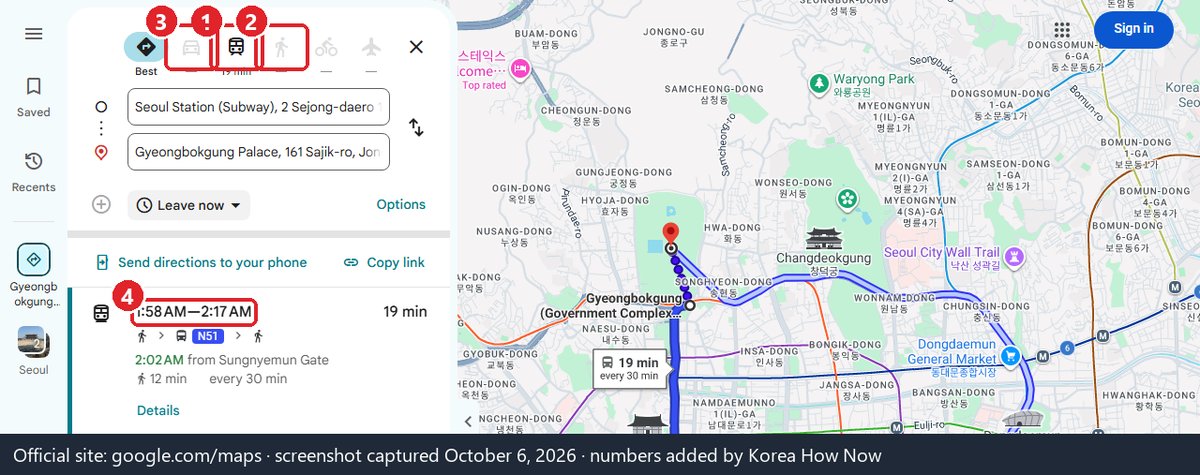
Transit is the one routing mode that works, so it’s worth knowing how it behaves:
- It picks up night buses. In our late-night test, Google suggested Seoul’s N16 night bus from Seoul Station, with its frequency. Good to know if you land on a late flight.
- It doesn’t walk you to the stop. Because walking directions are switched off, the short walk from your door to the station or bus stop isn’t drawn turn by turn. Check that part in Naver Map.
- Station names are in English, but exits matter in Korea. Large stations have many numbered exits, and the walk from the wrong one can be long. Look up the exit nearest your destination before you arrive, and use Naver Map’s alerts for when to get on and off.
- Use it to compare, not to navigate. A quick look at Google’s transit time is fine. Then follow the trip in Naver Map, which shows live bus arrivals and where to get off.
What to use instead
| App | Walking | Driving | Transit | English | Good for |
|---|---|---|---|---|---|
| Naver Map | Yes | Yes | Yes, real-time arrivals | Yes (also Chinese, Japanese) | Main app for most visitors |
| Kakao Map | Yes | Yes | Yes | English listed on the App Store; Korean-first | Backup if you read some Korean |
| Google Maps | No | No | Yes | Yes | Saved lists from home, rough planning |
Naver Map supports Korean, English, Chinese and Japanese. Its foreign-language version covers place search, translated visitor reviews, place filters, transit directions with real-time arrival information, subway maps and guidance on where to get on and off. Since June 4, 2026, foreign visitors can also verify with an overseas passport to book, order and pay through Naver Map without a Korean phone number. See our guide to Naver Map in English and passport sign-up.
More apps that do or don’t need a Korean number: which Korean apps work without a Korean phone number.
A simple setup that works
- Before you fly: keep your Google Maps lists, but also install Naver Map and switch it to English.
- Copy key places across. Save your hotel, your first-day sights and the airport train station in Naver Map too.
- On the ground: use Naver Map for anything that involves walking or a bus stop. Use Google Maps for a quick transit check if you prefer its layout.
- Taxis: show the driver the destination in Korean (copy it from Naver Map), or use a taxi app.
- Paying for rides: for busy Seoul days, see our guide to the Seoul Climate Card short-term pass (1 to 7 days of unlimited subway and bus).
- Data: both apps need mobile data. Compare the options in our guide to Korea eSIM vs USIM vs pocket Wi-Fi.
When the maps let you down
Google Maps says my walk is outside the coverage area.
That is the current Korea limit, not a bug or a problem with your phone. Switch to Naver Map or Kakao Map for that leg.
Google gave me a transit route but the bus didn’t come.
Google’s transit data in Korea doesn’t always show real-time arrivals. Naver Map shows live arrival times at most stops.
My Google Maps saved list is useless now.
Open each saved place, copy the Korean name or address, and search it in Naver Map. Korean names give the best results.
Can I drive a rental car with Google Maps?
No. Driving directions are not available. Use the rental car’s built-in navigation or Naver Map / Kakao Map.
I read that Google Maps now works fully in Korea.
The February 2026 decision is a conditional approval of data export. As of October 4, 2026, walking and driving directions still did not work in our test. Check the date on any article that says otherwise.
Need a taxi instead of transit? See taxi apps for tourists (k.ride, Uber, Kakao T).
Read next
Sources
- Korean government policy news (MOLIT / National Geographic Information Institute), Feb 27, 2026: conditional approval of 1:5,000 map data export, list of conditions, government check before export, suspension/revocation
- Joint government press material on the same decision, Feb 27, 2026 (attachments in HWP/PDF)
- Google Korea blog Q&A, Aug 5, 2025 (directions not offered in Korea; talks with the government)
- NAVER Corp., Dec 2024: Naver Map in English/Chinese/Japanese and its foreign-language features
- NAVER Corp., Jun 9, 2026: passport verification for bookings, orders, payments
- Our test: google.com/maps, Seoul Station → Myeong-dong Station, transit / walking / driving / biking, October 4, 2026
- NAVER Map on the App Store (languages, get-on/get-off alerts)
- KakaoMap on the App Store (languages: English and Korean)